Introducing timers on subtasks in Tiimo
Timers on subtasks make time visible for the smaller steps inside a task. Here’s what the feature does and how it gives you a clearer view as you go.
No items found.


Timers on subtasks make time visible for the smaller steps inside a task. Here’s what the feature does and how it gives you a clearer view as you go.
Tiimo now lets you add timers to your subtasks. Each smaller step can have its own timer, so you can see how much time is left for what you’re doing while keeping the rest of the task in view.
It brings two useful pieces together: the steps that make up a task and a visual way to follow the time spent on each one.
A subtask is a smaller step inside a larger task. “Prepare a presentation,” for example, might include outlining your ideas, making slides, and reviewing what you’ve written.
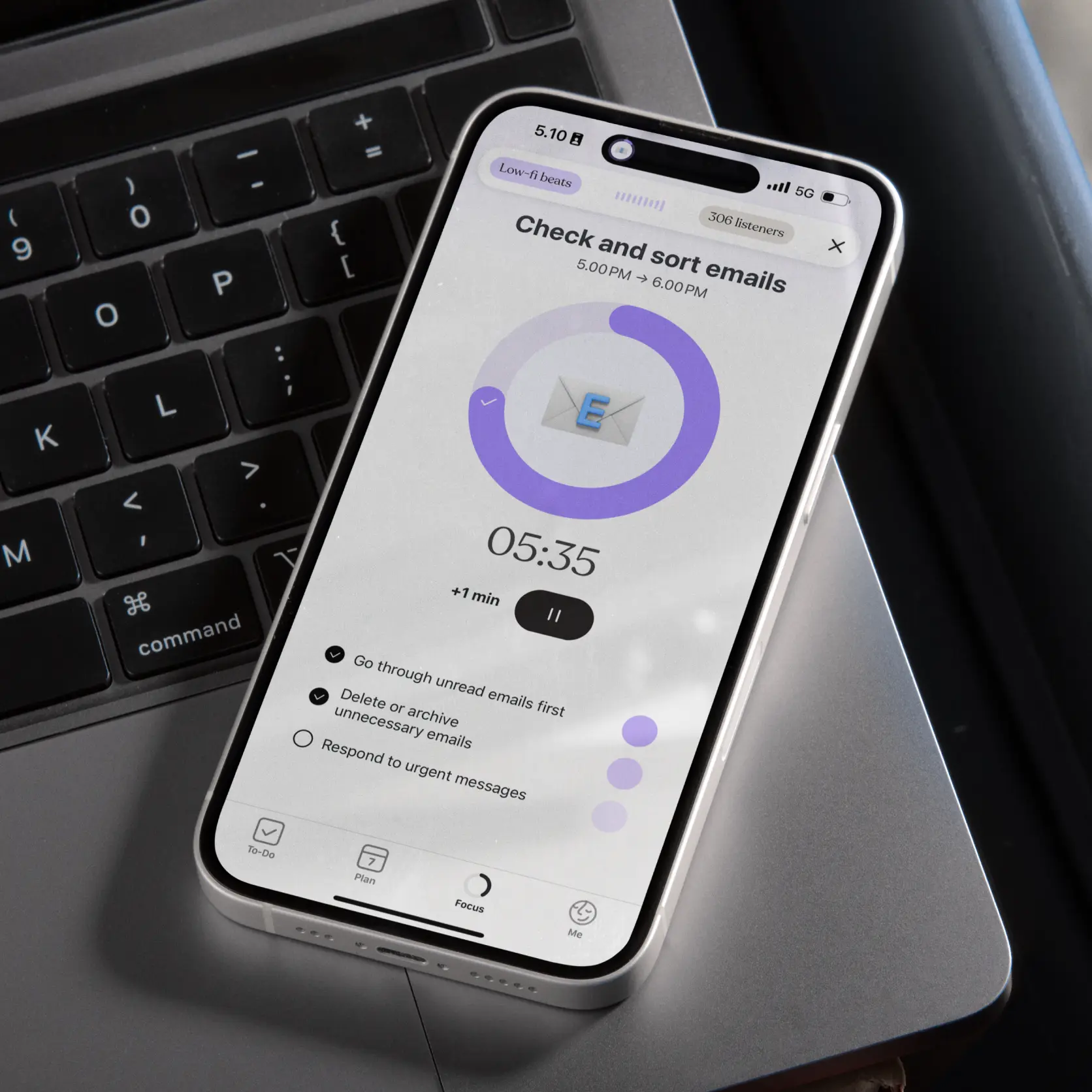
Subtask timers let you add a timer to those individual steps. The time left appears beside the current subtask, with a visual progress indicator that makes it easier to check at a glance.
Break a task into the steps you want to follow, then add timers to your subtasks. As you work through the task, Tiimo gives you a view of:
The smaller steps and their timing stay together. You can check the time for the part you’re working on without losing your overview of the whole task.
Knowing what to do and knowing how much time is left are different things. If you get absorbed in one part of a task, it can be hard to judge when to move on.
A visible countdown gives you a reference you can return to. It can help you notice the time left for the current step and decide what to do next, especially when a task has several parts.
The timer is there to support your sense of time. Your estimate is a starting point, and noticing that a step takes longer can help you plan it differently next time.
Use them for any task with smaller steps you want to time: working through a study session, preparing a presentation, or tackling household chores. Longer morning and evening routines are another useful example.
Start with a task you already have and the steps where seeing the time left would be helpful.
Timers on subtasks are available on web, Android, and iOS. Open Tiimo and add timers to the smaller steps inside your next task.

Timers on subtasks make time visible for the smaller steps inside a task. Here’s what the feature does and how it gives you a clearer view as you go.
Tiimo now lets you add timers to your subtasks. Each smaller step can have its own timer, so you can see how much time is left for what you’re doing while keeping the rest of the task in view.
It brings two useful pieces together: the steps that make up a task and a visual way to follow the time spent on each one.
A subtask is a smaller step inside a larger task. “Prepare a presentation,” for example, might include outlining your ideas, making slides, and reviewing what you’ve written.
Subtask timers let you add a timer to those individual steps. The time left appears beside the current subtask, with a visual progress indicator that makes it easier to check at a glance.
Break a task into the steps you want to follow, then add timers to your subtasks. As you work through the task, Tiimo gives you a view of:
The smaller steps and their timing stay together. You can check the time for the part you’re working on without losing your overview of the whole task.
Knowing what to do and knowing how much time is left are different things. If you get absorbed in one part of a task, it can be hard to judge when to move on.
A visible countdown gives you a reference you can return to. It can help you notice the time left for the current step and decide what to do next, especially when a task has several parts.
The timer is there to support your sense of time. Your estimate is a starting point, and noticing that a step takes longer can help you plan it differently next time.
Use them for any task with smaller steps you want to time: working through a study session, preparing a presentation, or tackling household chores. Longer morning and evening routines are another useful example.
Start with a task you already have and the steps where seeing the time left would be helpful.
Timers on subtasks are available on web, Android, and iOS. Open Tiimo and add timers to the smaller steps inside your next task.
Timers on subtasks make time visible for the smaller steps inside a task. Here’s what the feature does and how it gives you a clearer view as you go.


Tiimo now lets you add timers to your subtasks. Each smaller step can have its own timer, so you can see how much time is left for what you’re doing while keeping the rest of the task in view.
It brings two useful pieces together: the steps that make up a task and a visual way to follow the time spent on each one.
A subtask is a smaller step inside a larger task. “Prepare a presentation,” for example, might include outlining your ideas, making slides, and reviewing what you’ve written.
Subtask timers let you add a timer to those individual steps. The time left appears beside the current subtask, with a visual progress indicator that makes it easier to check at a glance.
Break a task into the steps you want to follow, then add timers to your subtasks. As you work through the task, Tiimo gives you a view of:
The smaller steps and their timing stay together. You can check the time for the part you’re working on without losing your overview of the whole task.
Knowing what to do and knowing how much time is left are different things. If you get absorbed in one part of a task, it can be hard to judge when to move on.
A visible countdown gives you a reference you can return to. It can help you notice the time left for the current step and decide what to do next, especially when a task has several parts.
The timer is there to support your sense of time. Your estimate is a starting point, and noticing that a step takes longer can help you plan it differently next time.
Use them for any task with smaller steps you want to time: working through a study session, preparing a presentation, or tackling household chores. Longer morning and evening routines are another useful example.
Start with a task you already have and the steps where seeing the time left would be helpful.
Timers on subtasks are available on web, Android, and iOS. Open Tiimo and add timers to the smaller steps inside your next task.
When you're ready, try Tiimo and make structure a little easier.

Siri integration, intelligent lists, snap to plans, and XL widgets. Here's everything Tiimo is bringing to iOS 27.
Five ADHD-friendly organization tips that reduce clutter and simplify cleaning.
Why some ADHD'ers are diagnosed later in life and where to find support.
